Data warehouse or a Lakehouse? I am sure every enterprise that is beginning their data analytics journey on Microsoft Fabric hurdles upon the same question. To add to this dilemma, we also have KQL Databases and DataMarts.
In this blog, I will shed some light upon each of the data stores and explore their pros and cons. Before we delve into comparisons let’s start with some basic explanations.
What is data warehousing in Microsoft Fabric?
A data warehouse according to the wiki is a ‘Central repository of integrated data from one or more disparate sources’. Microsoft Fabric data warehouse is a similar concept. It’s a lake-centric SaaS experience built on OneLake.
Now, OneLake in short is a logical data lake for your whole organization. We will talk about OneLake in another article.
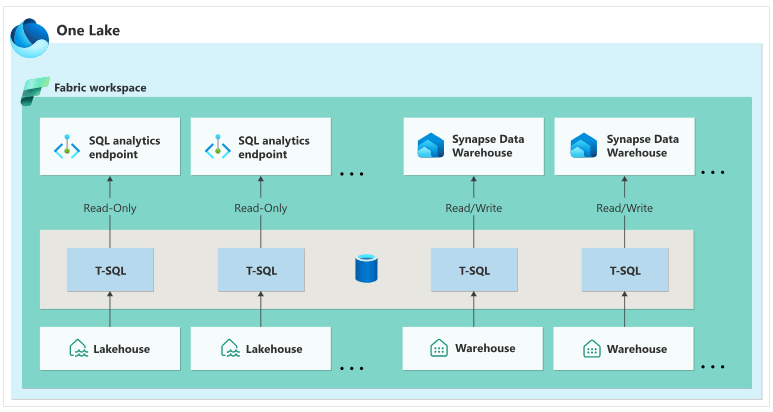
Without getting into too much details, there are two data warehousing experiences in Microsoft Fabric, SQL analytics endpoint of the Lakehouse and Synapse Data Warehouse. SQL analytics endpoint is a read-only warehouse however, the Synapse data warehouse is a traditional warehouse that supports full transactional T-SQL capabilities like creating tables, loading, transforming and querying data in the warehouse.
What is a Lakehouse in Microsoft Fabric?
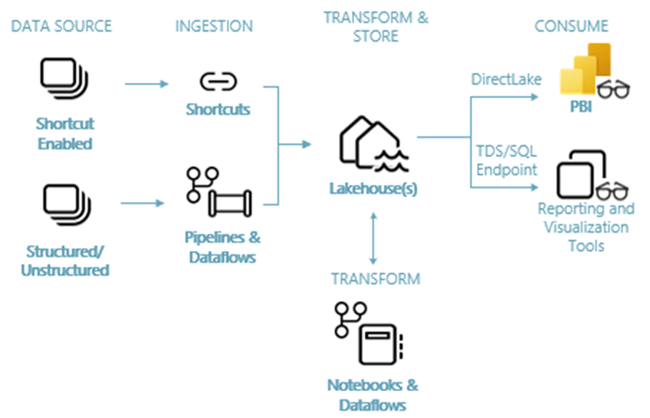
A Fabric Lakehouse is a data architecture platform which merges the best of both worlds into one data management solution, data warehouses and data lakes. A Lakehouse enables machine learning, BI, and predictive analytics which is supported by Notebooks which lets us interact with our data using multiple languages like Scala, PySpark, SparkSQL and R. A Lakehouse supports structured and unstructured data that can be stored in folders, files, or databases and tables.
What are KQL databases in Microsoft Fabric?
To understand a KQL database, we need to understand where it’s needed first. A KQL database is used for data storage and management in Real-Time Analytics. Real-time analytics in Fabric is a fully managed big data analytics platform optimized used for streaming real-time data as soon as they enter the system. Kusto Query Language (KQL) is optimized for querying massive data volumes and hence ideal for querying large volumes of data.
What is a Power BI datamart?
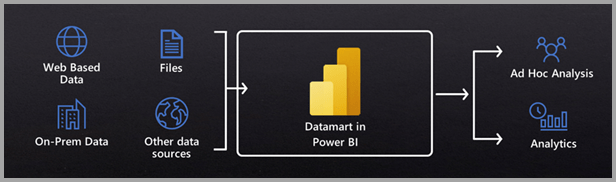
Datamarts can be considered as the go-to data source for business users and citizen developers. Users can build their own data marts using databases, local files, SharePoint sites and spreadsheets. Datamarts use fully managed Azure SQL DB. You still get the supported sematic model and a no-code experience to ingest data, extract transform and load the data using Power Query however, you are only limited to 100GB storage.
Final Verdict
Now that we have a sense what each data store is and what it really does- let’s do a quick comparison and consider some use cases for each. 1
Data Warehouse: If you are moving everything over from an existing synapse analytics or if all or majority of your data store users are SQL developers or if you are in need for multi-table transactions, or if you are looking for a more robust security, then choose a Fabric data warehouse.
Data Lakehouse: If you have a need to work with structure and unstructured data, or if you’re team members are familiar with Spark and T-SQL languages, or if you are looking to train and predict a ML model, then choose a Data Lakehouse.
KQL Database: If you are looking for a scalable data solution for real time data, or looking for a big data solution or real-time analytics on Fabric, or looking for a data store that can handle billion of rows of data, choose a KQL Database.
Datamarts: If you’re team only comprises of business users or citizen developers and if your data volume is under 100GB, then definitely go with a Power BI datamart.
I hope this article helped you decide over which data store to choose for your Fabric workload.
See you soon in the next article 🙂
 Data Skies
Leave a comment